oebridge北向通天塔
总体介绍
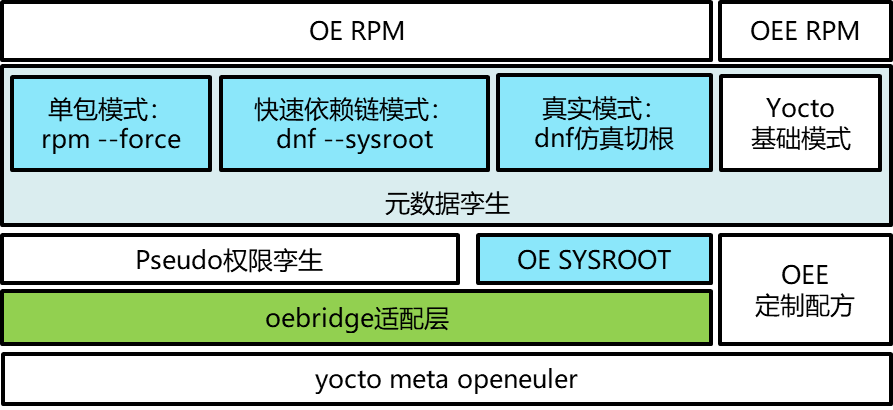
oebridge 是 openEuler Embedded 北向通天塔计划的核心组件,旨在打通 openEuler 服务器源与嵌入式系统的软件兼容复用通道。通过解决嵌入式与服务器端软件元数据不兼容、依赖链差异等问题,突破嵌入式北向生态软件数量有限的瓶颈,让嵌入式系统既能保留 Yocto 定制化优势,又能复用 openEuler 全站超 35000 款软件包的能力。
当前架构图如下,主要通过dnf包管理和openEuler源进行链接,后续将考虑如何更好的将嵌入式定制和epkg包管理进行结合。
![]()
图 1 oebridge基础架构
特性功能
支持 Yocto 构建阶段打包 openEuler 服务器源软件
支持嵌入式系统运行时通过 dnf 在线安装服务器源软件(开启特性后将自动集成dnf包管理工具)
构建指导
前提:需要构建所使用的host支持qemu-user-static,对于ubuntu机器,可通过如下命令安装:
$ sudo apt install qemu-user-static
其他host机器方法类似,请自行安装配置。
安装并配置qemu-user-static后,需要最终满足如下配置(aarch6作为target4为例):
$ cat /proc/sys/fs/binfmt_misc/qemu-aarch64 $ # 返回如下结果 $ .. $ interpreter /usr/bin/qemu-aarch64-static $ ... $ 注:可能interpreter是个软连接,指向qemu-aarch64-static
满足前提后,通过 oebuild 指定 -f oebridge 进行特性使能,其他构建流程不变。
建议配合 -f systemd 来使用,因为服务器版本较多基础软件依赖systemd座位启动底座。使能代码示例:
$ oebuild generate -p ${platform} -f oebridge -f systemd
已提供了基于oebridge的xfce案例,可通过 -f oebridge-xfce 进行特性使能,其他构建流程不变。
$ oebuild generate -p ${platform} -f oebridge-xfce -f systemd
特别说明:部分老容器由于权限问题,需要在 oebuild bitbake 进入容器后,给于oebridge需要的目录权限:
$ sudo chmod 777 /var/log/hawkey.log $ sudo chmod 777 /var/cache/dnf/
高阶定制——开发集成接口
1. 元数据孪生接口
该接口通过 ASSUME_PROVIDE_PKGS 变量来控制,用于建立嵌入式软件包与 openEuler 服务器软件包的映射关系,以便在安装服务器软件包时候,不必重新覆盖嵌入式的等同软件包。
oebridge框架class中,已为每个yocto配方(recipe)中统一新增 ASSUME_PROVIDE_PKGS 变量,默认值为 openeuler-src 源码仓中对应软件 spec 文件定义的「全量包名/子包名」,支持按需在配方中自定义映射关系。
如发现有软件包的默认映射有偏差,可支持三种映射指定模式,满足不同场景的适配定制:
# 1. 全包默认指定:适用于全局统一映射 ASSUME_PROVIDE_PKGS="包名1 包名2 ..." # 2. ${PN} 特别指定:针对当前配方主包(PN)自定义映射 ASSUME_PROVIDE_PKGS:${PN}="包名1 包名2 ..." # 3. ${PN}-xxx特别指定:针对配方子包(如${PN}-devel)自定义映射 ASSUME_PROVIDE_PKGS:${PN}-xxx="包名1 包名2 ..."
典型映射示例:
嵌入式recipe |
ASSUME_PROVIDE_PKGS 映射值 |
|---|---|
busybox |
which cpio vim-minimal diffutils systemd systemd-libs systemd-udev |
glibc-external |
glibc glibc-common |
base-files |
setup filesystem basesystem |
2. 离线集成拓展接口
该接口用于在yocto镜像制作时候,通过配置,直接集成openEuler源的软件包到镜像或文件系统中。
接口及配置方式上,支持3种软件扩展安装模式,适配不同场景需求:
(1) 模式 A:默认模式(快速依赖链模式)
用法:在离线安装列表中,通过追加服务器版本的包名(支持通配符),不带
:后缀修饰行为: 通过
dnf install在host中安装服务器源软件到目标架构的rootfs,自动识别嵌入式基座包的元数据,已满足依赖的包不会重复安装适用场景:用于追加基线北向软件,无依赖冲突场景,一般不需要修改当前的基线软件包。安装速度较快,但不支持
TARGET二进制的pre/post脚本执行(这种情况需要使用模式C)。
(2) 模式 B:强制安装模式(单包强制模式)
用法:相比于模式A,在包名后添加
:force标签行为: 将先通过默认模式即
dnf install安装一遍,然后会进一步通过rpm -ivh强制单包再重装一遍。适用场景:嵌入式与服务器软件存在依赖冲突,需强制使用服务器版本(单包)的场景,目前已经有一份极限,一般不需要修改当前的基线软件包。
(3) 模式 C: 仿真安装模式(兼容性强)
用法:相比于模式A,在包名后添加
:real标签行为: 将在A和B模式所涉及的软件包执行集成后,使用
QEMU+切根的仿真环境进行dnf install。注意如果AB中已经包含了该软件包,相当于元数据已经存在,就不会再重新安装。适用场景:普遍适用于需追加集成北向软件的场景,建议使用此接口来扩展OSV所需要的OE北向软件。
示例如下(meta-openeuler/recipes-core/packagegroups/packagegroup-oebridge.bb)
# will call dnf to install INSTALL_PKG_LISTS's pkgs when do_rootfs # the :force tag will force to install by using rpm -ivh and cover the pkg whatever oee do. # note that: # do not add oee's rpm and dnf(it depends on python3), # we should use oe2403's python modules due to python3 version diffs. INSTALL_PKG_LISTS = " \ libsigsegv \ libev \ info \ chkconfig \ kbd-legacy \ kbd-misc \ keyutils-libs \ libutempter \ libverto \ man-db \ newt \ slang \ kpartx \ openssl-pkcs11 \ crypto-policies \ dracut \ krb5-libs \ libkcapi \ os-prober \ grubby \ dnf \ rpm \ " # we should ensure libstdc++ api is compatible, ohterwise we need oe's libstdc++. # currently, oee's python3 is diff from oe2403, shoud use oe2403's pkg. # other libs is incompatible with config, use oe's pkg, list is: INSTALL_PKG_LISTS += " \ python3:force \ python3-pip:force \ systemd-libs:force \ libgomp:force \ libvorbis:force \ libogg:force \ ncurses-libs:force \ libsndfile:force \ libsamplerate:force \ flac:force \ glib2:force \ avahi-libs:force \ gobject-introspection:force \ " # add for advance install oe pkgs using chroot target arch with qemu, need qemu-user-static of host # note kernel bellow 6.9 patch need xorg-x11-server-1.20.11-32 # see https://gitee.com/src-openeuler/xorg-x11-server/commit/d8c7ac6e53e01fa757e58ed044b9915756d826b1 XFCE_PKG_LISTS = " \ dejavu-fonts:real \ liberation-fonts:real \ gnu-*-fonts:real \ wqy-zenhei-fonts:real \ xorg-*:real \ ${@bb.utils.contains('DISTRO_FEATURES', 'kernel6', '', 'xorg-x11-server-1.20.11-32*:real', d)} \ ${@bb.utils.contains('MACHINE', 'hieulerpi1', 'xorg-x11-server-1.20.11-32*:real', '', d)} \ xfwm4:real \ xfdesktop:real \ xfce4-*:real \ xfce4-*-plugin:real \ network-manager-applet:real \ " INSTALL_PKG_LISTS += "${@bb.utils.contains('DISTRO_FEATURES', 'oe-xfce', d.getVar('XFCE_PKG_LISTS'), '', d)}"
应用范例
xfce桌面应用
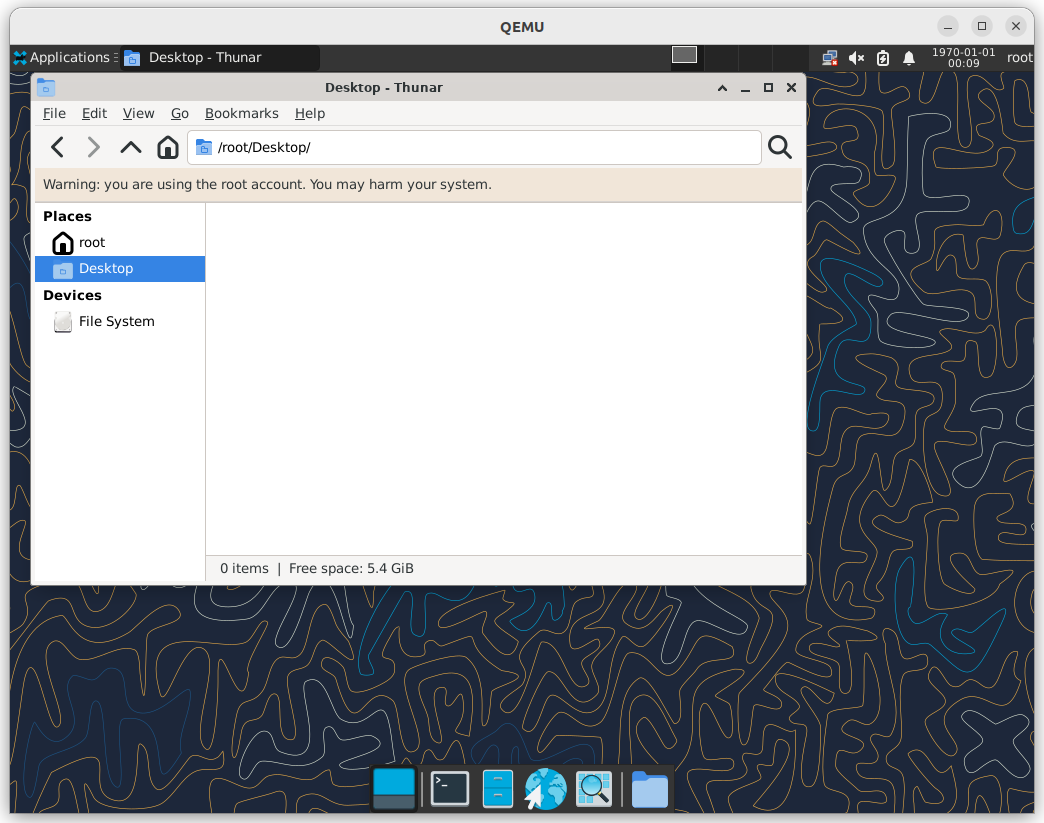
oebridge可以将xfce桌面系统的软件包集成到openEuler Embedded镜像中,用户可以在嵌入式系统中运行xfce桌面环境。软件包源默认采用openEuler服务器源,用户也可以根据需要配置其他软件源。以下将以qemu-aarch64为例进行说明。
构建方式:
# 在完成创建oebuild工作环境后,执行以下命令
oebuild samples // 列出构建模板,选择qemu-aarch64-xfce-systemd对应的编号等待完成构建
启动命令:
因为是qemu镜像,因此需要提前安装好qemu-system-aarch64仿真器。
# 安装qemu-system-aarch64仿真器
sudo apt install qemu-system-aarch64 // ubuntu桌面系统
# 启动qemu-aarch64镜像
# 在qemu-aarch64-xfce-systemd目录下执行以下命令
sudo qemu-system-aarch64 -M virt -smp 8 -cpu cortex-a72 -m 16G --kernel output/<timestamp>/zImage --initrd output/<timestamp>/openeuler-image-qemu-aarch64-*.rootfs.cpio.gz -display sdl -device virtio-vga -device qemu-xhci -usb -device usb-mouse -device usb-kbd -device usb-tablet -device virtio-net-device,netdev=tap0 -netdev tap,id=tap0,script=/etc/qemu-ifup -serial stdio
# 在启动后以root用户登陆,执行以下命令启动xfce桌面系统
startxfce4
效果图如下: